
Vinted France · app + Chrome extension
FillSell for Vinted France: crosslist, relist and delist from your phone
FillSell is a crosslisting app (iPhone, Android, web) paired with a Chrome extension that works on Vinted France in your session: it posts your listings, imports your wardrobe in one tap and bumps them back up with one tap or, depending on your subscription, in your time slot. When Vinted marks an item sold, FillSell records the sale on its own and takes its proven copies down elsewhere. Your Vinted password? Never.
- Vinted
Free to start, no credit card

The gist in 10 seconds
- On Vinted France (vinted.fr), the FillSell Chrome extension posts, reads, reposts and removes your listings in your own session, one at a time, at a human pace.
- One tap on Sync brings the Vinted listings you already have live into your FillSell stock, free and with no limit, without publishing or editing anything.
- When Vinted marks an item sold, FillSell records the sale on its own; proven copies come down from your other marketplaces, and any doubt becomes the question “Already sold?”.
- Depending on your subscription, automatic reposting bumps your listings back up on Vinted, Leboncoin, Beebs, and Depop, on the days and in the time slot you choose, with your computer on.
- FillSell never asks for your Vinted password: you sign in to Vinted in Chrome as usual, and the extension works inside that session.
What FillSell does on Vinted
Single and bulk publishing
Your listing fitted to the site’s fields: category, size, colour, parcel.
Sync
One tap on “Sync” files your live listings into your stock.
Sale recorded on its own
When the site marks the item as sold, FillSell records the sale.
Copies removed
Sold here, removed there: the item’s other listings come down. When in doubt, “Already sold?”.
Automatic reposting
Your listings climb back on their own, on the days and in the time slot you choose.
Bump with one tap
A listing running out of steam goes back to the top when you decide.
In your session
The Chrome extension works in your own session: never your password.
Computer on
Actions go out while Chrome is open; when it’s off, they wait in line.
Today
FillSell works today with vinted.fr.
How it goes
Step 1
Create your FillSell account
On iPhone, Android or at fillsell.app, with your email or your Google account (or Apple on iPhone and on the web). Free to start, no credit card.
Step 2
Add the Chrome extension on your computer
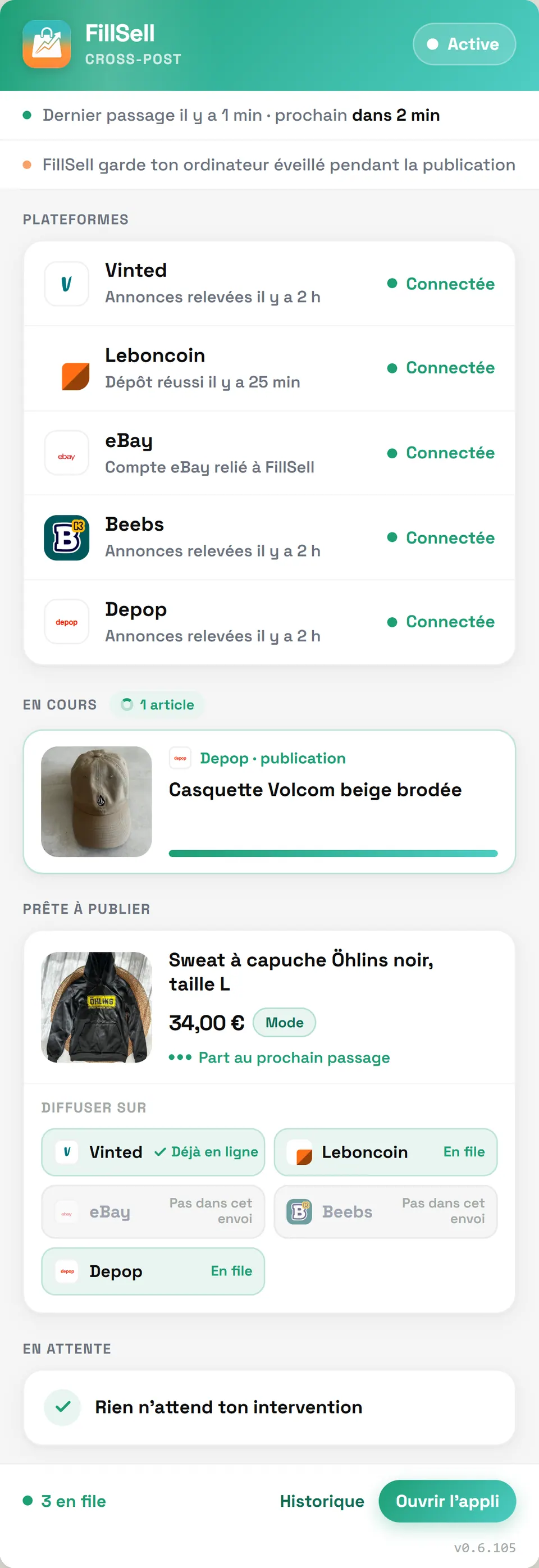
Once, for free, from the Chrome Web Store. Sign in to Vinted in Chrome as you always do: the extension works inside that session and never needs your password.
Step 3
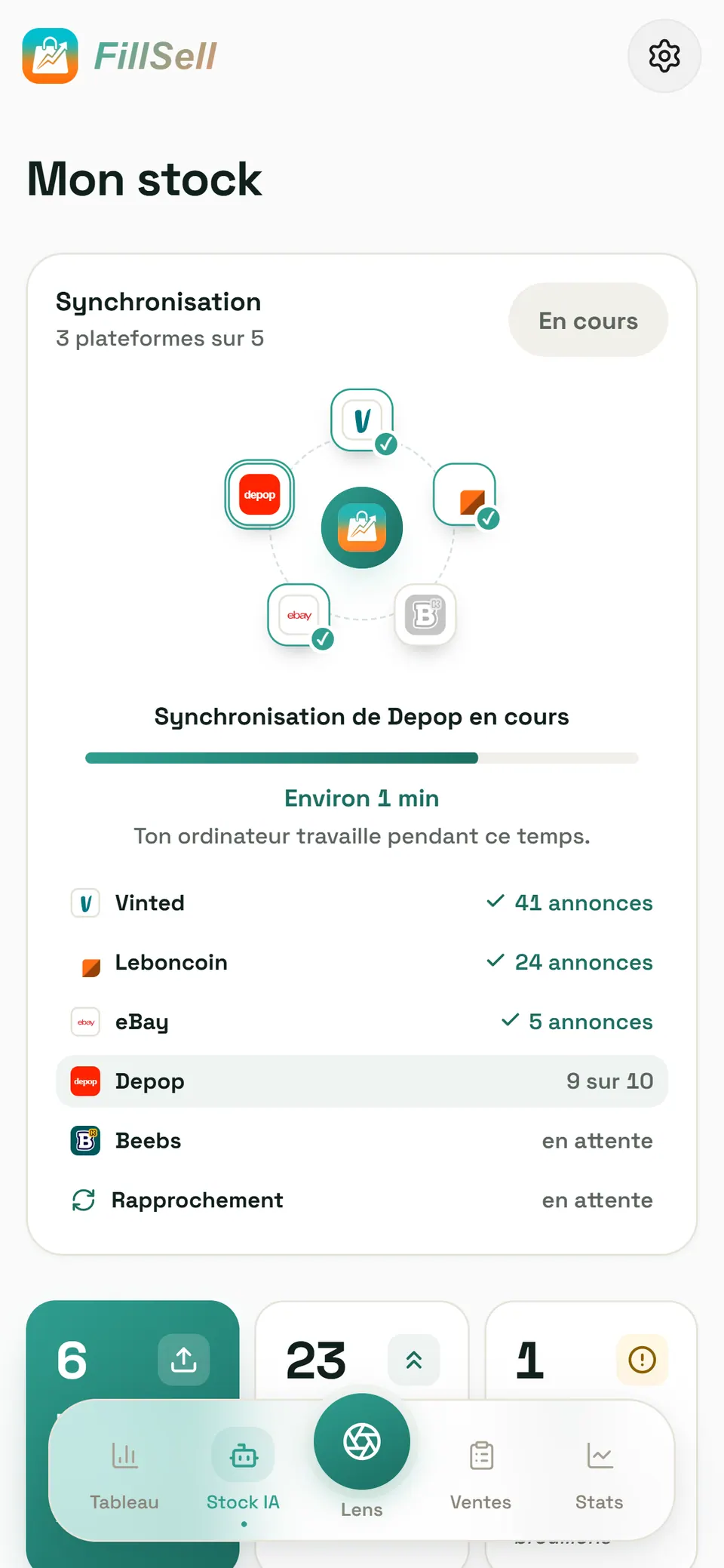
Tap Sync
The Vinted listings you already have live land in your stock, filed alongside those from your other marketplaces. Nothing is published, nothing is edited.
Step 4
List elsewhere, sell everywhere
Tick your other marketplaces, check what will go out, send: your computer posts the listings one by one. When an item sells, its proven copies come down; any doubt, the app asks you first.


App screenshot, demo account: illustrative figures.
Why plug your Vinted into FillSell?
Vinted is where second-hand fashion lives. But a listing that only exists on Vinted only ever meets Vinted's buyers. With FillSell, your wardrobe becomes a stock: one card per item, listed wherever you decide among Vinted, Leboncoin, eBay, Beebs, and Depop, tracked all the way to the sale.
The split of roles is what makes it work:
- Your phone runs the show. You take the photo, read the listing, tick your marketplaces and follow your sales. In the app, wherever you are.
- Your computer does the work. The FillSell Chrome extension works on Vinted in your session: it fills in Vinted's forms, one listing after another.
- You stay in charge. Any doubt, FillSell asks you instead of guessing.
One listing, five marketplaces. Nothing to retype from what you already have on Vinted. And listings that climb back up, with one tap or, depending on your subscription, in the time slot you chose.
Vinted in 2026: what to know before you sell
Vinted has reach: it reports 31 million average monthly active recipients across its connected EU markets on 31 July 2026 (a figure published under the EU Digital Services Act, on its Our platform page). Before you multiply your listings there, here are the rules that matter, read on Vinted's official pages on 9 October 2026.
| Topic | What Vinted says | What it changes for you |
|---|---|---|
| Selling | “There are no fees for selling on Vinted” for a private seller | Selling costs you nothing; only the visibility options are paid |
| Buying | The “Vinted fee”, a mandatory platform fee paid at checkout, “usually 5% + €0.70”, VAT included (price list updated 5 October 2026) | It's added to what the buyer pays, not to your costs |
| Postage | Always paid by the buyer; you get a prepaid label | You pack it, you drop it off |
| Shipping deadline | 5 working days, otherwise the order is cancelled automatically | Your stock must be up to date: an item already gone elsewhere can't be shipped |
| Carriers on Vinted France | Mondial Relay, Chronopost, Colissimo, Vinted Go and DHL Express | The buyer chooses and pays |
| Photos | Up to 20 per listing, taken by you; “no image editing is allowed” | Post your real photos, as they are |
| Duplicates | “Identical items can't be listed twice on Vinted” | One Vinted listing per item; your other marketplaces do the rest |
| Offers | A buyer can offer up to 40% below the original price | Set your price knowing your margin |
| Visibility | How long ago an item was uploaded is a ranking factor; paid Bump for 3 or 7 days; paid Showcase | A recent listing gets seen more |
| Sold elsewhere | “please hide or delete it from your Vinted listings instead of marking it as ‘Sold’” | That's exactly what FillSell does after the sale |
Sources, read on 9 October 2026 — in English: selling basics, price list, catalogue rules, uploading step by step, an item displayed as sold, recommended content; for Vinted France, in French: sending a parcel, shipping options, offers, catalogue rules.
One point that matters a lot if you buy to resell: “Standard Vinted accounts are for private, non-commercial use only”, and Vinted France's catalogue rules ask anyone who sells as a professional to open a Vinted Pro account. That's a question of status, to sort out with Vinted before you even pick a tool.
Publish: one card, a listing cut for Vinted
It starts with a photo. Lens, FillSell's AI (how it works, in French), recognises the item, reads the brand when it's written on the item, suggests a condition (from “New with tags” to “Satisfactory”) and writes the title and description. The suggested price? Lens looks for comparable listings on Vinted first, then on eBay and Leboncoin, and tells you how many listings it's based on. You read it, fix it, approve it.
Then each marketplace gets its own version. For Vinted: the right spot in Vinted's category tree, the size, the colour, the parcel size. A detail missing? A category nowhere to be found? The app asks you, with ready-made choices. Never a reminder on a loop, never a marketplace quietly greyed out.
Working in English? The app is available in English and French, and the listing headed for vinted.fr is drafted in French, the language Vinted France's buyers search in. You read every version before it goes out.
The posting happens on your computer: the extension fills in Vinted's form, listing after listing, at a human pace. A whole batch? Pick the items in your stock, tick the marketplaces, the app prepares everything, you check, off it goes.
One habit to keep: on Vinted, photos show the item as it is. Post them as they are.
Sync: your whole Vinted wardrobe, filed in one tap
Already selling on Vinted? Don't retype a thing. Tap Sync: the extension reads the Vinted listings you already have live, and they land in your FillSell stock, filed alongside those from your other marketplaces. Free, with no item limit. Nothing is published, nothing is edited.
An item live on Vinted and somewhere else becomes a single card. FillSell compares the photos AND the title, never one without the other. Whenever it's unsure, the question “Is it the same item?” waits for you in a separate list of listings to check, outside your stock. And two Vinted listings are two units: FillSell never merges one into the other.
Repost: bump your Vinted listings back up
Why repost (or relist, as many sellers say)? Because on Vinted, a listing's age counts. How long ago an item was uploaded is one of the ranking factors Vinted publishes, and Vinted says it promotes new listings (recommended content). A listing that gets older slides down. Reposting sends it back to the top.
Reposting means taking the listing down and putting it back online. Let's be straight with you: it isn't Vinted's paid Bump. The new listing climbs back to the top, but its views and favourites start from zero. Better you hear it from us.
Two ways to do it:
- With one tap. Pick a listing, tap, and your computer reposts it; several at once depending on your subscription, reposted one by one.
- Automatically, depending on your subscription. Your listings bump themselves back up on Vinted, Leboncoin, Beebs, and Depop. You choose the days, the time slot (morning, noon, evening or custom) and the age from which a listing goes back up, never less than a week. Computer on, Chrome open, and you get on with something else.

The safeguards are built around your account: reposts spread over your time slot, one at a time, never in bursts; no automatic reposting on Vinted while Vinted is running a check on your account; and you switch everything off in one tap, whenever you want. The details: automatic reposting (in French).
Sell: Vinted says “sold”, FillSell records it and takes the copies down
This is where it all happens. When Vinted marks your item sold, FillSell records the sale on its own, on proof: your Vinted wardrobe or the listing page read as sold. Then the item's other listings are removed from your other marketplaces, as long as a proof links them to it: posted by FillSell, same identifier, imported, linked by you, or identical photo.
A copy FillSell isn't sure about? No removal in the dark. FillSell asks you “Already sold?”, and you decide: “Yes, remove it” or “No, it's another copy”.

Demo account, illustrative figures.
The other way round, your Vinted listing comes down too. Sold on eBay? The sale records itself. Sold on Leboncoin or Beebs? You confirm with one tap. Once the sale is recorded, the extension deletes the Vinted listing linked to the item by a proof. Which is precisely what Vinted's help centre asks for: hide or delete, don't mark it “Sold”.

Demo account, illustrative figures.
And after that? The sale lands in your Sales tab, margin worked out for you; an item whose purchase price you don't know is left out of the maths rather than counted as free. When FillSell records a sale on Vinted, you get an email. To spot your Vinted sales and remove your listings, your computer needs to be on with Chrome open. The whole picture, marketplace by marketplace: selling the same item on several marketplaces without selling it twice (in French).
Your Vinted session, never your password
The FillSell extension installs for free from the Chrome Web Store, once, and updates itself (install the extension). You sign in to Vinted in Chrome, as you always do, and the extension works inside that session. FillSell neither reads nor stores your Vinted password.
It works in a minimised window, without taking over what you're doing, one listing after another, at a human pace. While listings are still queued, it keeps your computer from going to sleep; the screen can switch off. Computer off? Nothing is lost: everything waits and goes out the next time Chrome opens. One FillSell extension per browser. Fair warning: the extension's panel is in French for now; the app, where you do everything else, speaks English.
Today, FillSell works with Vinted France, on vinted.fr. Vinted's own terms, quoted word for word, and what FillSell does to space out its actions: keeping your accounts safe (in French).
Beyond Vinted: the routes that widen your audience
Your Vinted wardrobe is a starting point. Every other marketplace opens another door:
- Vinted and Leboncoin. Leboncoin reports 30 million monthly visitors (press release of 25 March 2026), well beyond fashion, and hand-over in person is still an option. The guide: Vinted and Leboncoin at the same time, from an app in English.
- Vinted and Beebs. Second-hand for kids and families, now open to adult fashion and the home as well. The guide: moving your Vinted listings to Beebs, and back.
- Vinted and eBay. Link your eBay account, and eBay's official API publishes on eBay France, even with your computer off. The guide: FillSell for eBay.
- Vinted and Depop. Home turf for vintage and streetwear: Depop reports 7 million active buyers worldwide at 31 December 2025. The guide: selling on Vinted and Depop (in French).
Ready? Create your account for free, add the extension, tap Sync. Your Vinted wardrobe fits in your pocket.
Frequently asked questions
Is FillSell a Vinted extension or an app?
Both, each with its own role. The FillSell app (iPhone, Android, and the web at fillsell.app) is where you create your listings, run your stock and follow your sales. The Chrome extension, installed on your computer, does the work on Vinted: it fills in the forms, reads your listings, spots your sales, removes and reposts, inside your session.
Does FillSell need my Vinted password?
No, never. You sign in to Vinted in Chrome as usual, and the extension works inside that open session. FillSell neither reads nor stores your Vinted password.
Does my computer have to stay on?
For Vinted, yes: posting, reposting, removing a listing and spotting a sale all need your computer on, Chrome open and your Vinted session active. While listings are queued, the extension keeps the computer awake. Computer off, nothing is lost: everything waits for the next time Chrome opens.
How do I bump a Vinted listing with FillSell?
By reposting it: the extension takes it down and puts it back online, and it starts again from the top of the results, with views and favourites reset to zero. Do it with one tap or, depending on your subscription, let automatic reposting take care of it on Vinted, Leboncoin, Beebs, and Depop, on the days and in the time slot you choose. It isn't a Bump: it's a new listing.
What happens when my item sells on Vinted?
When Vinted marks the item sold, FillSell records the sale on its own, then the item's listings linked by a proof are removed from your other marketplaces. For an uncertain copy, FillSell asks you “Already sold?” before touching it. Once the sale is recorded, you also get an email.
Is it risky for my Vinted account?
No tool can guarantee an account will never be restricted, and FillSell doesn't promise that. Since summer 2026, sellers have reported 24-hour restrictions for “automated activity”; Vinted hasn't published any statement about it. FillSell plays it safe: it acts in your session, one listing after another, at a human pace, pauses automatic reposting on Vinted while Vinted is checking your account, and you switch everything off in one tap. Vinted's rules are in section 6 of its terms and conditions; our account safety page (in French) quotes them word for word.
Does FillSell work with Vinted UK, Ireland or other Vinted sites?
Not today: FillSell works with Vinted France, on vinted.fr. Vinted's other sites (vinted.co.uk, vinted.ie, vinted.be, vinted.es, vinted.it…) aren't covered today.
How much does FillSell cost for selling on Vinted?
You start for free (€0), no credit card; Premium is €12.99, Pro €29.99 and Business €59.99 a month, no commitment. The Chrome extension is free, and so is syncing. On Vinted's side, selling costs a private seller nothing: buyers pay the Vinted fee. Every plan in detail: FillSell pricing.
Routes with Vinted
- Vinted to Beebs: move your listings over, and back againPut your Vinted wardrobe on Beebs without retyping a word: sync, tick Beebs, check, send. Both directions, sales and delisting covered, fees and rules compared.
- Vendre sur Vinted et Depop : une annonce, deux vitrinesMets tes annonces Vinted sur Depop, et l'inverse, sans les retaper : format Depop, frais comparés, et l'annonce retirée de l'autre côté quand l'article se vend.
- Vendre sur Vinted et eBay avec une seule ficheVends sur eBay et Vinted sans rien retaper : l'IA rédige les deux annonces, eBay relié publie même ordinateur éteint, et la vente est suivie des deux côtés.
- Vinted and Leboncoin at the same time: crosslist both ways, in EnglishCrosslist Vinted ↔ Leboncoin from an app in English: Lens drafts the French listings, one stock covers both, and the other copy comes down after a sale.
Read next
- Vinted and Leboncoin at the same time: crosslist both ways, in EnglishCrosslist Vinted ↔ Leboncoin from an app in English: Lens drafts the French listings, one stock covers both, and the other copy comes down after a sale.
- Vinted to Beebs: move your listings over, and back againPut your Vinted wardrobe on Beebs without retyping a word: sync, tick Beebs, check, send. Both directions, sales and delisting covered, fees and rules compared.
- FillSell for eBay: the eBay crosslisting tool you run from your phoneCrosslist to eBay France from your phone: link your account once and your listings go out through eBay's official API, even with your computer off.
- FillSell for Beebs: sell on Beebs without retyping a single listingSell on Beebs, France's family second-hand app, without retyping: fill in the listing once, the FillSell extension posts it in your session, reposts it, delists it.
- Leboncoin in English: how to sell as an expat (2026)Leboncoin has no English version and listings must be in French. How to sell there from France, step by step, and the English app that writes them in French.
- FillSell pricing: free to start, no commitment after thatFillSell is free to start, no credit card. Premium €12.99, Pro €29.99, Business €59.99 a month, no commitment: what each plan includes, and how it compares.
Your stock deserves to be seen everywhere.
Create your account in a minute, sync your listings, and let FillSell do the rest.


Free to start, no credit card