
Crosslisting, run from your phone
The crosslisting app: one photo, five marketplaces. Sold here, removed there.
FillSell is a crosslisting app you run from your phone. One photo, Lens writes the listing, and the Chrome extension posts it to Vinted, Leboncoin, eBay, Beebs, and Depop from your computer, in your own session. Your stock syncs in one tap, your listings bump themselves back up on Vinted, Leboncoin, Beebs, and Depop depending on your subscription, and once a sale is recorded, the item's other listings come down.
Free to start, no credit card



Works today with
- Vinted
- Leboncoin
- eBay
- Beebs
- Depop
The gist in 10 seconds
- One photo is enough: Lens recognises the item, reads the brand, suggests a condition and a price based on comparable listings, then writes the title and description.
- Fill it in once, tick where it goes among Vinted, Leboncoin, eBay, Beebs, and Depop: each site gets a listing shaped to its own fields (category, size, colour, parcel).
- Today FillSell works with accounts based in France, including Vinted France (vinted.fr) and eBay France (ebay.fr). The app itself is in English and French.
- Bump a listing back up with one tap. Depending on your subscription, your listings also bump themselves back up on Vinted, Leboncoin, Beebs, and Depop, on the days and in the time slot you choose, with your computer on.
- Sold here, removed there: once a sale is recorded — on its own on Vinted and eBay, with one tap from you elsewhere — the item's other listings are removed. When in doubt, it asks you “Already sold?” first.
How it goes
Step 1
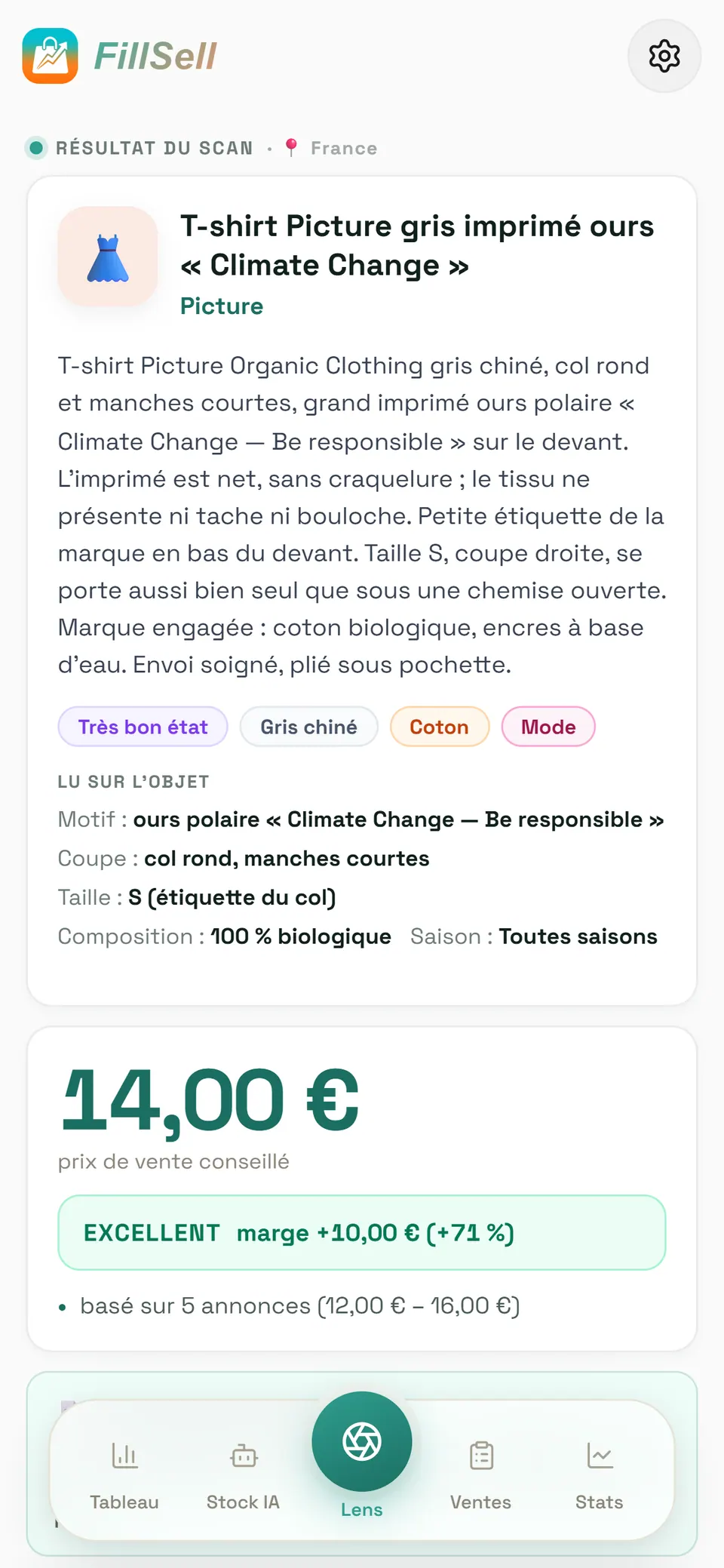
Snap the item
Lens recognises the item, reads the brand on the label, suggests a condition and a price based on comparable listings online, then writes the title and description. You check, you tweak, done.
Step 2
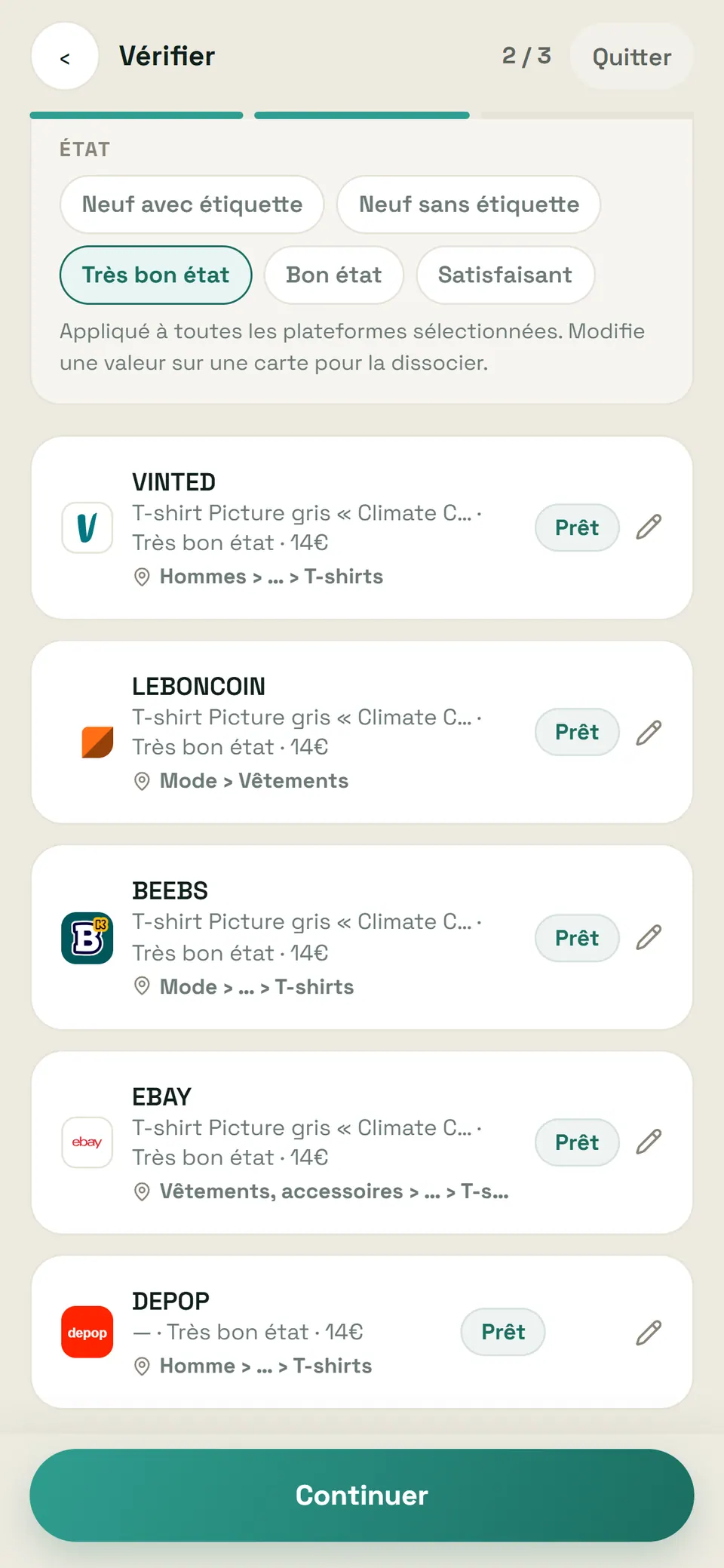
Tick your marketplaces
Choose where the listing goes among Vinted, Leboncoin, eBay, Beebs, and Depop. Each site gets a listing shaped to its own fields (category, size, colour, parcel), and you check every card on screen: nothing goes out until you say so.
Step 3
Your computer posts, in your session
The Chrome extension posts your listings one by one, at a human pace, in the accounts you're already signed in to. Never your password. eBay France account linked? eBay's official API takes over, even with your computer off.

Step 4
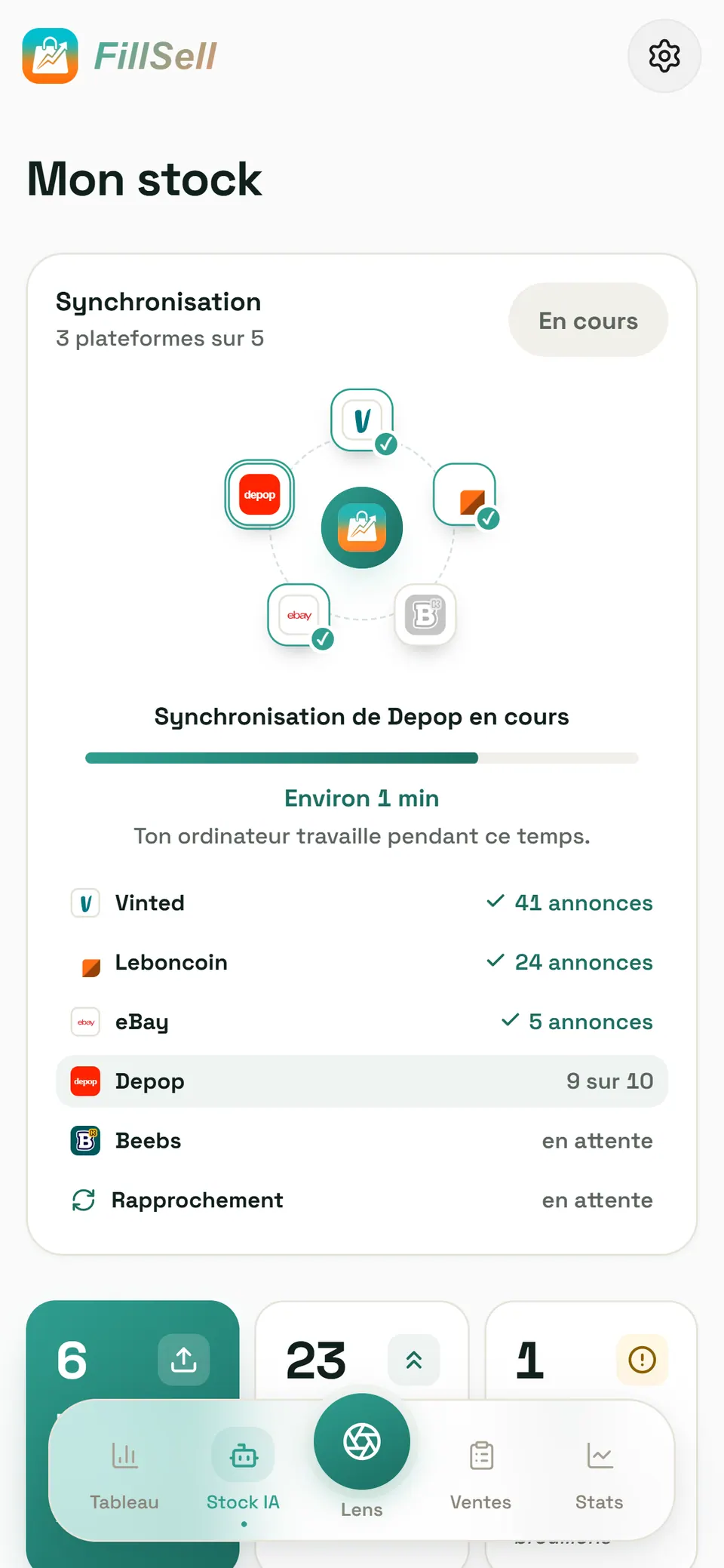
Sync your whole stock
One tap on Sync and the listings you already have live land in your stock, neatly filed. The same item on several marketplaces becomes one card; when in doubt, the app asks you.
Step 5
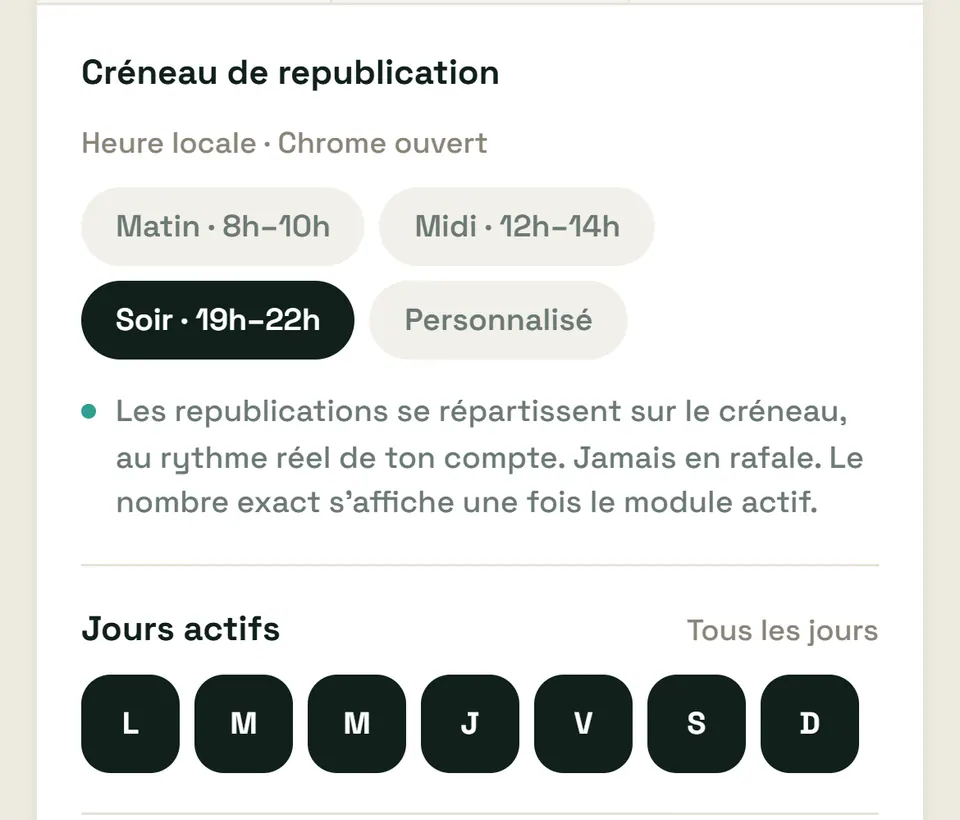
Let your listings bump back up
An ageing listing slides down the results. You bump it back up with one tap. Depending on your subscription, automatic reposting also brings it back up on Vinted, Leboncoin, Beebs, and Depop, on the days and in the time slot you choose, at a human pace, with your computer on. Switch it all off in one tap.
Step 6
Sold here, removed there
Once a sale is recorded, the item's other listings are removed, marketplace by marketplace. If FillSell has any doubt about a listing, it asks you “Already sold?” before touching it.
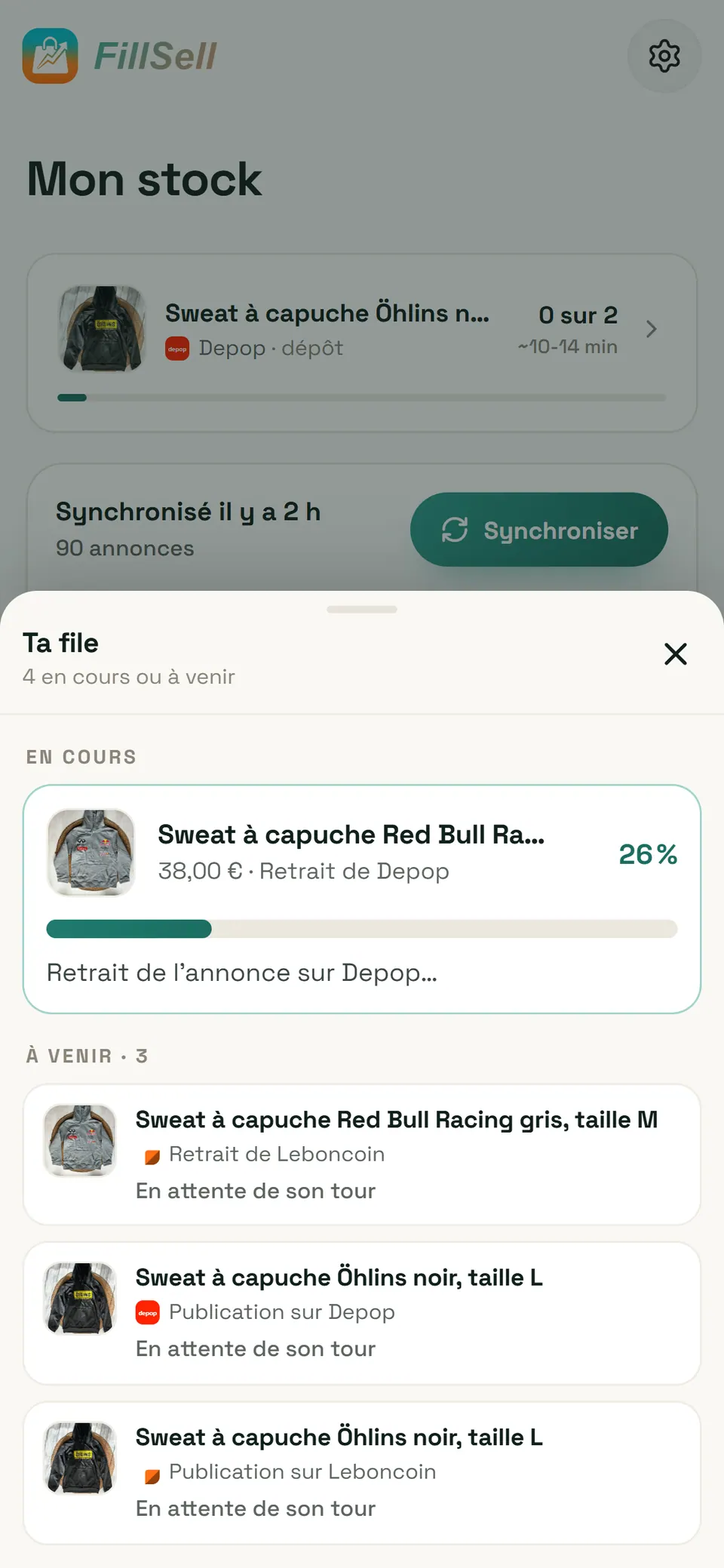


App screenshot, demo account: illustrative figures.
Everything you need to sell faster
Lens: the listing, written from a photo
Item, brand read on the label, condition, a price based on comparable listings, title and description. You check, you tweak: your listing is ready to go.
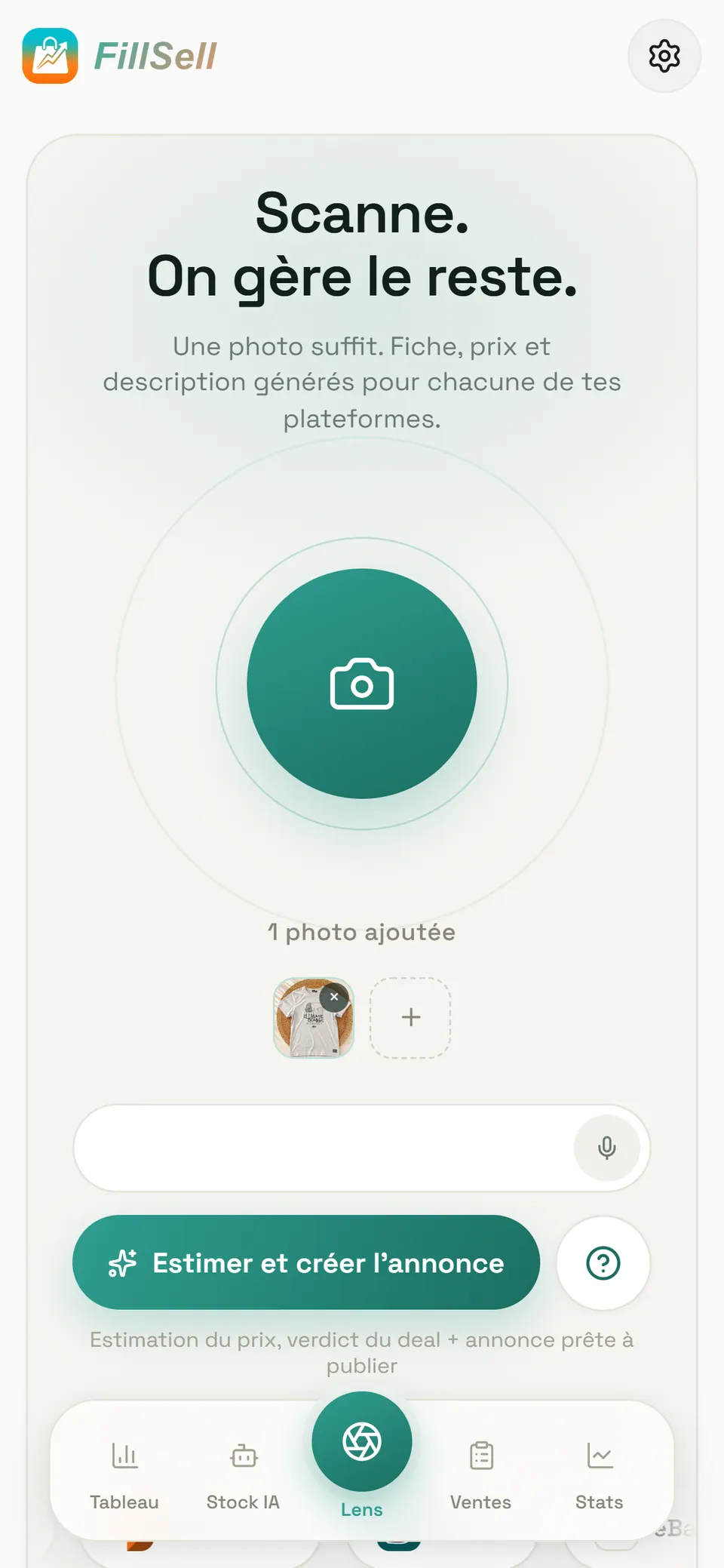
Leboncoin and Vinted, from an app in English
Lens drafts your listings in French for the French sites, and one stock covers both. Crosslisting Vinted and Leboncoin without the translation headache.
Your whole stock, synced in one tap
The listings you already have live land in your stock, neatly filed, free and with no limit. The same item on several marketplaces becomes a single card.
Listings that bump back up
With one tap, or on their own depending on your subscription: automatic reposting runs on Vinted, Leboncoin, Beebs, and Depop, on the days and in the time slot you choose. Human pace, off in one tap.
Sold here, removed there
A recorded sale takes the item's other listings down. When in doubt, FillSell asks you “Already sold?” before touching anything.
eBay through its official API
Link your eBay France account and your eBay listings go out through eBay's official API, even with your computer off. An eBay sale is recorded on its own.
Beebs, covered too
Family fashion, toys, childcare gear: Beebs gets its own version of your listing, kept in the same stock as everything else you sell.
Your margin works itself out
Sales, fees, margin and monthly profit, no spreadsheet. An unknown purchase price is left out of the maths, never counted as zero: your numbers stay honest.

FillSell in action
From photo to sale, without a single copy-paste: your live listings filed into one stock, Lens writing a listing from a photo, publishing from your phone, listings climbing back up, copies removed after a sale and your margin worked out for you.
A silent walkthrough with on-screen text, from syncing to the sale.
Read the transcript
- 0:00 One photo.
- 0:00 Five marketplaces. (logos: Vinted, Leboncoin, eBay, Beebs, Depop)
- 0:01 Ctrl + C · Ctrl + V (crossed out)
- 0:01 Without a single copy-paste.
- 0:03 FillSell — Vinted · Leboncoin · eBay · Beebs · Depop — One app.
- 0:05 Lens screen: “Scan. We handle the rest.”
- 0:05 Step 1/5 · Photo
- 0:05 Take a photo. Lens looks at the item.
- 0:07 Lens writes the listing: title, description, brand read on the item, suggested condition.
- 0:07 Scan result — Grey Red Bull Racing hoodie, size M — Pepe Jeans — Grey Red Bull Racing hoodie, Pepe Jeans collection: logos printed on the chest, kangaroo pocket, drawstring hood. Very good condition, size M. — Very good condition · Grey · Cotton · Fashion — Read on the item: Brand: Pepe Jeans (printed logo); Size: M (collar label) — €38.00 suggested selling price — Excellent, margin +€27.00 (+71%) — based on 6 listings (€32.00 – €45.00) — Create the listing
- 0:09 And suggests the price. You check, you publish.
- 0:12 Step 1 of 3 — Where to publish? — Grey Red Bull Racing hoodie, size M, €38 — Marketplaces: Vinted, Leboncoin, Beebs, eBay, Depop (Connected), all ticked — Publish on 5 marketplaces
- 0:12 Step 2/5 · Publish
- 0:12 Tick your marketplaces. Vinted · Leboncoin · eBay · Beebs · Depop
- 0:14 Live on all five: one listing after the other, without a single copy-paste.
- 0:14 Publishing started — Vinted, Leboncoin, Beebs, eBay, Depop, one after the other: Queued… / Listing… / Live — Published · 5 live
- 0:20 Step 3/5 · Bump
- 0:20 Automatic reposting — On for Vinted, Leboncoin, Beebs and Depop (switch on)
- 0:20 A listing gets older… it slides down the list.
- 0:20 Listings: Black Öhlins hoodie, size L, €34, live for 15 days · White Polo Ralph Lauren swim shorts, size M, €35, 22 days · Cyrillus leather kids’ boots, size 24, €29, 27 days · Beige embroidered Volcom cap, €15, 31 days · Black Picture surf print T-shirt, size M, €16, 35 days → Back on top ✓
- 0:22 It bumps itself back up: on the days and in the time slot you choose, with your computer on.
- 0:26 Step 4/5 · Sell — The Red Bull Racing hoodie, €38 on Vinted, Leboncoin, eBay, Beebs and Depop
- 0:26 Sold on Vinted! The sale records itself. (SOLD! · +€27.00)
- 0:27 Sold here, removed there. Leboncoin, eBay, Beebs, Depop: FillSell removes the copies as soon as the sale is recorded. (Leboncoin, eBay, Beebs, Depop: REMOVED ✓)
- 0:31 Any doubt? It asks you before touching a listing. — Already sold? — Yes, remove it — No
- 0:34 Step 5/5 · Track — Camille’s month — Demo account · illustrative figures
- 0:34 +€1,268 profit this month · 62 sales — This month €1,268.00, 62 sales · Avg. margin 68.5% since the start
- 0:34 Her margin, worked out on its own: sales, profit, stock — the app does the maths.
- 0:37 Sold on five marketplaces, Depop included.
- 0:37 Sales by marketplace: Vinted €870.00 (31 sales) · eBay €329.00 (6 sales) · Depop €322.00 (8 sales) · Leboncoin €281.00 (10 sales) · Beebs €99.00 (7 sales) — Best margin: Depop 74.0%
- 0:40 Best sellers: The North Face Nuptse puffer, €80.00 (€55.00 → €135.00), 2 days in stock · Vintage Carhartt Detroit jacket, €63.00 (€22.00 → €85.00), 1 day in stock · Olympus film camera, €57.00 (€22.00 → €79.00), 3 days in stock
- 0:40 Her best pieces: gone in 1 to 3 days, on Vinted, Depop and eBay.
- 0:43 Sync — Vinted 41 listings · Leboncoin 24 · eBay 5 · Beebs 10 · Depop 10 — Synced · 90 listings
- 0:43 Already have listings live? One tap on “Sync”.
- 0:44 Your whole stock comes in, neatly filed. Free and unlimited.
- 0:47 FillSell — One listing. Five marketplaces. — Vinted · Leboncoin · eBay · Beebs · Depop — iPhone · Android · Chrome — Start for free — fillsell.app
- 0:48 Demo data. Vinted, Leboncoin, eBay, Beebs and Depop are trademarks of their respective owners. FillSell is not affiliated with, endorsed or sponsored by any of these marketplaces.
What is crosslisting?
Crosslisting means putting the same item up for sale on several second-hand marketplaces at once. More sites, more buyers who see it. Done by hand, it's a grind: retype the title, re-upload the photos, rewrite the description site by site, then race to take the other listings down when the item sells.
With FillSell you write it once — and Lens does the writing. Each marketplace gets a listing shaped to its own fields, your stock stays up to date in one tap, and a recorded sale takes the item's other listings down.
How do you sell the same item on Vinted and Leboncoin at the same time?
Create the listing once, tick Vinted and Leboncoin (plus any of your other marketplaces), and the Chrome extension posts each version from your computer, one listing after another, at a human pace. The item is then live on both sites, each with a listing in its own format — in French, as the French sites expect.
The day it sells on Vinted, FillSell records the sale on its own and removes the Leboncoin listing. If it sells on Leboncoin, you confirm the sale with one tap, and the Vinted listing comes down in turn. If there's any doubt, the “Already sold?” question comes first. Step by step: crosslisting Vinted and Leboncoin in English, selling the same item on several marketplaces without double-selling (in French), and if Leboncoin is new to you, how to sell on Leboncoin in English.
Your phone runs the show, your computer does the work
That's FillSell's edge. On your phone (iPhone or Android) or at fillsell.app, you snap, tick and confirm — at the flea market, on the train, from the sofa. On your computer, the Chrome extension does the legwork on the sites: it fills in the forms, reads your listings, spots your sales, removes and reposts, one listing at a time, in a minimised window that never takes over your screen.
It works in your own session, the one you're already signed in to. FillSell never asks for your Vinted, Leboncoin, Beebs or Depop passwords; for Depop, you allow access with one click in the extension. Computer off? Nothing is lost: your listings wait and go out the next time Chrome opens. And on eBay France, once your account is linked on eBay's official page, your listings go through eBay's official API, even with your computer off.
What FillSell does on each marketplace
| Marketplace | What you do there with FillSell | Who does the work | Computer |
|---|---|---|---|
| Vinted (vinted.fr) | publish, sync, repost, remove copies | the extension, in your session | on, Chrome open |
| Leboncoin | publish, sync, repost, remove copies | the extension, in your session | on, Chrome open |
| eBay (ebay.fr) | publish, sync, remove copies | eBay's official API once your account is linked, otherwise the extension | not needed once linked (otherwise on, Chrome open) |
| Beebs | publish, sync, repost, remove copies | the extension, in your session | on, Chrome open |
| Depop | publish, sync, repost, remove copies | the extension, after one click on “Autoriser Depop” (allow Depop) | on, Chrome open |
Depending on your subscription, automatic reposting runs on Vinted, Leboncoin, Beebs, and Depop. When Vinted or eBay marks your item as sold, FillSell records the sale on its own. On Leboncoin and Beebs, it asks you to confirm with one tap.
Where it works today: Vinted, Leboncoin, eBay, Beebs, and Depop, with accounts based in France — that means Vinted France (vinted.fr), eBay France (ebay.fr) and a French Depop account, in euros. Vinted UK, eBay.co.uk and eBay.com aren't covered today.
Why FillSell for your crosslisting?
Because it runs the whole journey, from the photo to the sale, not just the posting:
- It all starts on your phone: iPhone and Android apps, and the same app on the web. The computer does the work, you do the selling.
- Lens writes your listings: item, brand read on the label, condition, a price based on comparable listings, title and description.
- One card for Vinted, Leboncoin, eBay, Beebs, and Depop, each listing adapted to its site's fields.
- Your live stock imported in one tap, free and with no limit, one card per item.
- Your listings bump back up with one tap or, depending on your subscription, on their own on Vinted, Leboncoin, Beebs, and Depop, in the time slot you choose.
- Sold here, removed there, and any doubt becomes a question, not a mistake.
Your margin, worked out for you
Every sale lands in your numbers: purchase price, sale price, fees, margin, monthly profit and sales by marketplace. An item whose purchase price you don't know is left out of the calculation rather than counted as free: your margin stays real. Your stock has no item limit, even on the free plan, and exports to Excel whenever you like. More on the maths: how to calculate your reselling profits (in French).

A plan for every pace
Start for free. Step up when you sell more, no commitment.
Free
To get started
€0 / month
- Lens: one photo, one written listing
- 5 listings created and published on all your platforms a month
- 50 repostings a month
- Margins and profit worked out for you
Premium
To sell every week
€12.99 / month
- 40 listings created and published on all your platforms a month
- 1,500 repostings a month
- AI touch-up — 5 listings retouched a month (up to 5 photos each)
- Repost in bulk, in one go
- Email support
Our pick
Pro
For high volumes
€29.99 / month
- 120 listings created and published on all your platforms a month
- 5,000 repostings a month
- AI touch-up — 20 listings retouched a month (up to 5 photos each)
- Bulk reposting, without a second thought
- Priority support
Business
To make it your business
€59.99 / month
- 300 listings created and published on all your platforms a month
- Unlimited repostings — repost whenever you want, as much as you want
- AI touch-up — 50 listings retouched a month (up to 5 photos each)
- Priority support
In every plan
- Publishing on Vinted, Leboncoin, eBay, Beebs, and Depop
- Syncing of your listings, free and unlimited
- Sold here, removed there: the item's other listings come down
- Unlimited stock items, Excel export and import
Monthly prices, no commitment. Free sign-up, no credit card. Each plan's volumes are shown in the app before you buy.
Frequently asked questions
What is a crosslisting app?
A crosslisting app puts the same item up for sale on several marketplaces from a single card, then helps you keep track of those listings. FillSell goes all the way: Lens writes the listing from a photo, syncing brings in the stock you already have live, and the item's other listings are removed once its sale is recorded.
Which marketplaces and countries does FillSell work with?
Today, Vinted, Leboncoin, eBay, Beebs, and Depop, with accounts based in France (vinted.fr for Vinted, ebay.fr for eBay). You tick, item by item, where each listing should go. Vinted UK, eBay.co.uk and eBay.com aren't covered today. FillSell is not affiliated with any of these marketplaces.
Is FillSell available in English?
Yes: the app on iPhone, Android and the web is in English and French, and Lens drafts your listings in French for the French sites. The Chrome extension and its store page are in French for now.
Do I need to keep my computer on?
For the extension to do its work (publishing, reposting, spotting your sales, removing listings), your computer must be on with Chrome open; while listings are queued, the extension keeps it from going to sleep. Computer off? Nothing is lost: everything waits and goes out the next time Chrome opens. The exception: on eBay France, once your account is linked, your listings go through eBay's official API, even with your computer off.
Does FillSell ask for my passwords?
Never. You stay signed in to your accounts in your browser as usual, and the extension works within those sessions. For Depop, you allow access with one click in the extension. For eBay, you link your account on eBay's official page: FillSell never sees your password.
Can I bring in the listings I already have live?
Yes. One tap on Sync and your listings already live on Vinted, Leboncoin, eBay, Beebs, and Depop land in your stock, neatly filed, free and with no limit. Syncing reads your listings: nothing is published or edited. The same item on several marketplaces becomes one card when its photos and title match; when in doubt, FillSell asks you.
What happens when an item sells?
When Vinted or eBay marks your item as sold, FillSell records the sale on its own. On Leboncoin and Beebs, it asks you to confirm with one tap. Once the sale is recorded, the item's other listings are removed. If FillSell has any doubt about a listing, it asks you “Already sold?” before touching it.
How much does FillSell cost?
FillSell is free to start (€0), no credit card needed. Premium is €12.99, Pro €29.99 and Business €59.99 a month, no commitment. Your plan counts the items written by AI; once written, an item goes out to all your marketplaces at no extra count. And your stock has no item limit, even on the free plan. Details: FillSell pricing.
Read next
- FillSell pricing: free to start, no commitment after thatFillSell is free to start, no credit card. Premium €12.99, Pro €29.99, Business €59.99 a month, no commitment: what each plan includes, and how it compares.
- FillSell for Vinted France: crosslist, relist and delist from your phoneImport your Vinted France wardrobe in one tap, crosslist it, relist it, delist copies when it sells. From your phone, never your password.
- Vinted and Leboncoin at the same time: crosslist both ways, in EnglishCrosslist Vinted ↔ Leboncoin from an app in English: Lens drafts the French listings, one stock covers both, and the other copy comes down after a sale.
- Vinted to Beebs: move your listings over, and back againPut your Vinted wardrobe on Beebs without retyping a word: sync, tick Beebs, check, send. Both directions, sales and delisting covered, fees and rules compared.
- Leboncoin in English: how to sell as an expat (2026)Leboncoin has no English version and listings must be in French. How to sell there from France, step by step, and the English app that writes them in French.
Your stock deserves to be seen everywhere.
Create your account in a minute, sync your listings, and let FillSell do the rest.
Free to start, no credit card